Scheduling
Schedule your videos in advance and maintain a consistent posting schedule across all platforms.
How It Works
- 1.Upload your video and customize settings as usual
- 2.Instead of publishing immediately, choose "Schedule"
- 3.Select date and time
- 4.Your video will be automatically posted at the scheduled time
Important Notes
Processing Time
Each platform processes uploads differently. After your scheduled video is posted, it may take a couple of minutes before it becomes visible on your profile.
Failure Notifications
If scheduling fails for any reason (e.g., platform issues, authentication problems), you will be immediately notified via email with details about what went wrong.
View Your Past Scheduled Posts
When scheduling new content, you can see your previously scheduled posts by opening the "Your Schedule" section. This helps you plan your content strategy and avoid posting at overlapping times.
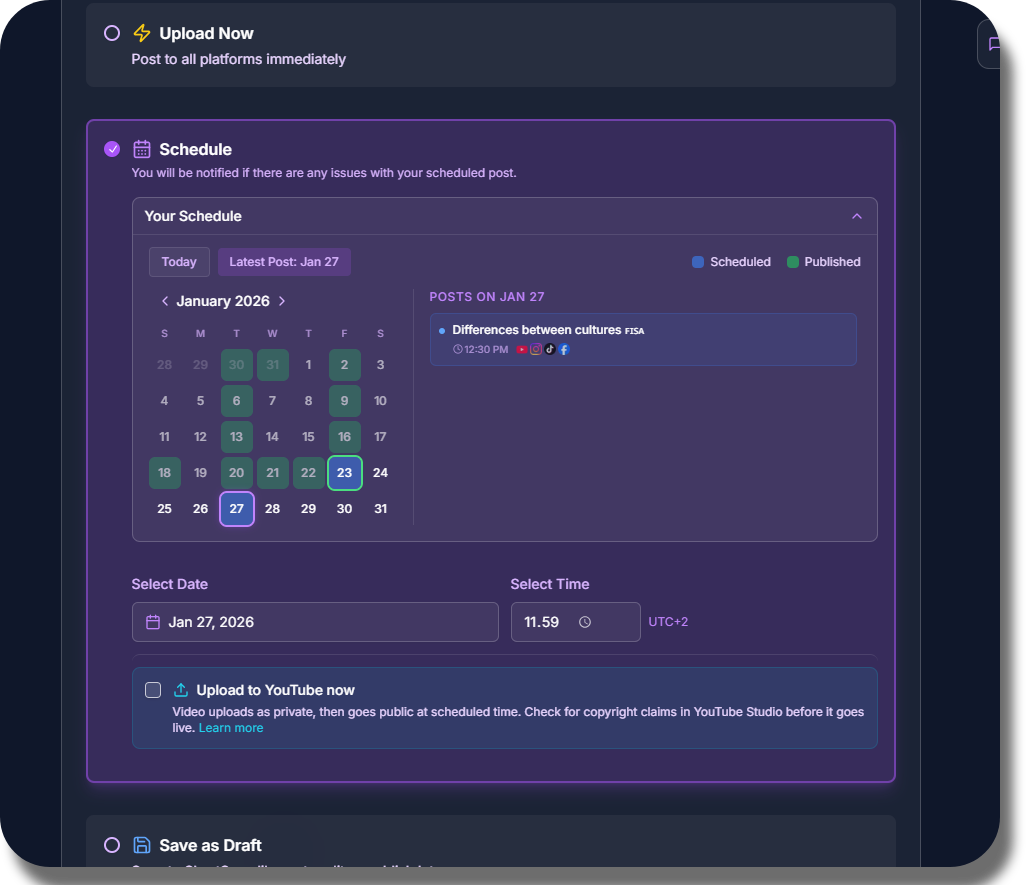
The calendar shows your previously scheduled and published posts
Why Scheduling Matters
Consistent posting is key to growing your audience. With scheduling, you can:
- •Maintain a regular posting schedule without manual work
- •Post at optimal times for each platform's audience
- •Batch-create content and schedule weeks in advance
- •Never miss a posting window, even when you're busy